
Android 17 AI Features: Gemini Intelligence and More
I have used Android for years, through updates that changed almost nothing and updates that changed everything. Android 17 falls into the second group: the AI is no longer locked inside one app — it lives in the operating system itself. Android 17, codenamed Cinnamon Bun, went stable on June 16, 2026, and after a few weeks on a Pixel 11, the useful parts are genuinely useful — and the limits are worth knowing.
TL;DR: Android 17’s headline AI feature is Gemini Intelligence, an on-device agent that handles multi-step tasks across your apps in the background. It needs Gemini Nano v3, a flagship chip, and at least 12GB of RAM, so only newer phones like the Pixel 10 and 11, Galaxy S26, OnePlus 15, and OPPO Find X9 qualify — the Pixel 9 does not. Rambler turns messy dictation into clean text, and Gemini in Chrome can compare tabs and book appointments. Google’s AI promises have been slow to feel useful before, so daily use is the real test.
What Gemini Intelligence Actually Does
The first thing I noticed is that Gemini Intelligence does not feel like a chatbot — I did not open an app and type a prompt. I asked my phone to sort out a Saturday plan — check my calendar, find a restaurant near where I was meeting a friend, and book a table — and it went away and did it while I kept scrolling through photos. That is the whole idea: an AI layer built into Android 17 that acts as an agent, handling multi-step tasks across apps in the background while you do something else.
Google announced Android 17 on May 12, 2026 at The Android Show, and the stable release landed on June 16, 2026, as API level 37. The beta had been out since February 13, so developers had months to prepare, and it shows — the features that need apps to talk to each other actually work. When I asked it to pull an address from an email into a calendar invite, it just did it, then showed me a short summary so I could undo mistakes.
What makes this different from the Gemini app is the depth of access: it can see across your messages, calendar, browser tabs, and notes, then chain actions together. I asked it to compare flight options from two emails with my calendar and hold the better one. It took about forty seconds. Much of it runs on the device itself, using Gemini Nano v3, so there is no loading spinner and your data stays on your phone. If you want the full picture, our new features in Android 17 guide covers the rest, and the complete Android 17 tips guide shows how to get the most out of all of it.
The Catch: Will Your Phone Actually Get Gemini Intelligence?
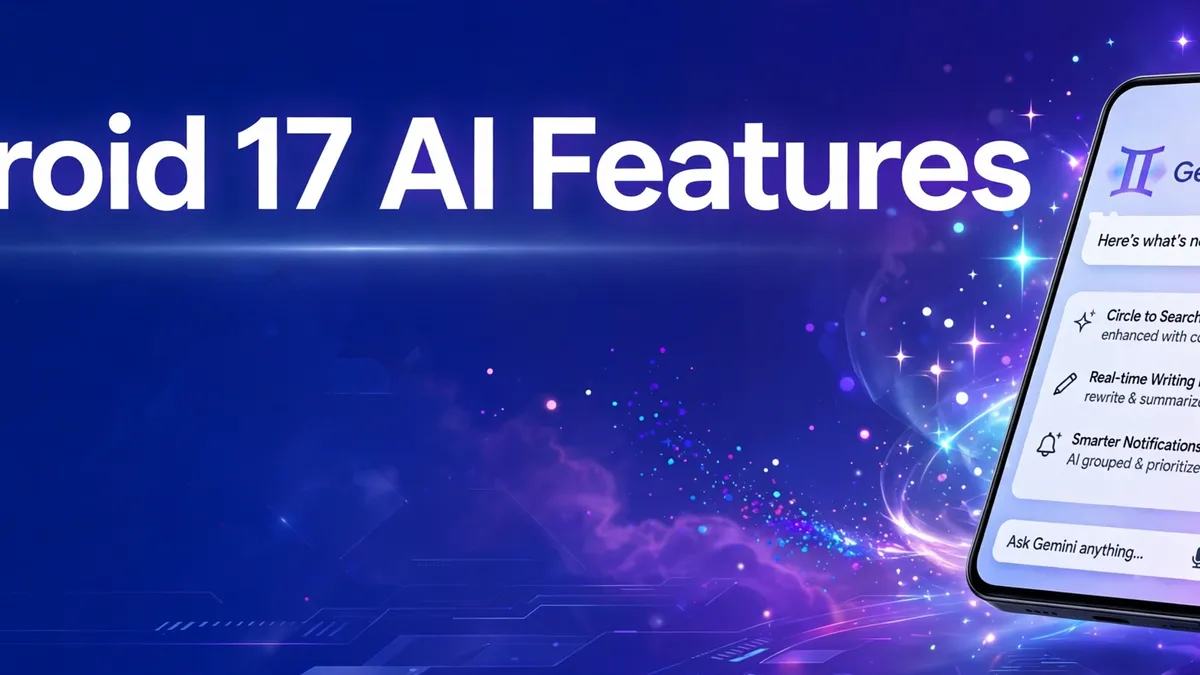
Here is the part nobody puts in the launch video. Gemini Intelligence needs serious hardware: Gemini Nano v3 or newer, a flagship-grade processor, and at least 12GB of RAM. That cuts out a lot of good phones. My friend’s Pixel 9 has 16GB of RAM and is barely two years old, but it runs Gemini Nano v2, and Google has drawn the line at v3. The Galaxy Z Fold 7, the OnePlus 13, and the Galaxy S25 Ultra are in the same boat — fine phones that do not qualify.
The phones that do qualify are the newest flagships: the Pixel 10 and 11, Galaxy S26, OnePlus 15, and OPPO Find X9 and X8. The first phones to ship with Android 17 were the Galaxy Z Fold 8 and Z Flip 8, shown at Unpacked on July 22, 2026 and in stores on August 7. The Pixel 11 series followed, announced on August 12, 2026, with the Pro Fold in October. If you are buying a phone this year and AI matters, check this list first.
| Phone | Gemini Intelligence | Why |
|---|---|---|
| Pixel 10 series | Yes | Gemini Nano v3, 12GB+ RAM |
| Pixel 11 series | Yes | Ships with Android 17, Nano v3 |
| Galaxy S26 series | Yes | Flagship chip, 12GB+ RAM |
| OnePlus 15 series | Yes | Flagship chip, 12GB+ RAM |
| OPPO Find X9 / X8 | Yes | Flagship chip, 12GB+ RAM |
| Pixel 9 | No | Gemini Nano v2, not v3 |
| Galaxy S25 Ultra | No | Does not meet the hardware bar |
| OnePlus 13 | No | Does not meet the hardware bar |
| Galaxy Z Fold 7 | No | Does not meet the hardware bar |
That table tells you where Google is heading: the AI features are becoming a reason to buy the newest phone, not just a bonus on the one you own. Android 17 is already the 3rd most popular Android version at 11.69% share — fast for a release that only went stable in June 2026. Check the official details on the Android 17 developer page, and GSMArena keeps a good running list of which models have received the update.
Custom Widgets That Build Themselves
My home screen used to be a graveyard of widgets I set up once and never looked at again. Gemini Intelligence changed that: now I can describe the widget I want in plain language and the phone builds it. I asked for one showing my next three calendar events with the weather next to each one, and ten seconds later there it was. No template, no dragging boxes around.
The second time, I asked for a widget with my step count, my next alarm, and my earbuds’ battery level in one place. It worked. The third time, I asked for one tracking a package, and it pulled the info from my email. None of this is life-changing alone, but together it means my home screen finally shows what I actually check. If you like making your phone your own, our customization tips for Android 17 go deeper into widgets and themes.
There are limits. The widgets it builds are simple — a few pieces of information arranged neatly. It will not build a complicated dashboard, and a vague description gets you a vague widget. “Show me something useful” got me a clock. Be specific: name the apps and the information you want.
Rambler: Gboard Finally Understands How People Actually Talk
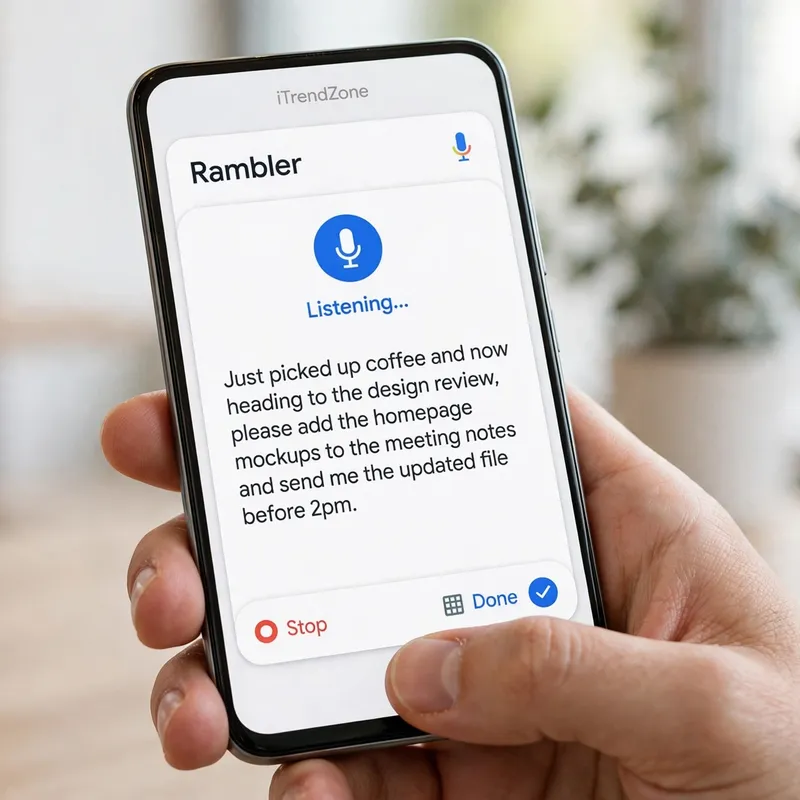
I dictate a lot of messages while walking, and until now, voice typing has been a test of patience. I would ramble out a thought, change direction mid-sentence, correct myself, and end up with text that read like someone thinking out loud. Rambler, the new AI dictation mode in Gboard on Android 17, fixes this, and it is the feature I miss most on other phones.
The difference is simple. Standard voice input captures everything verbatim, including every “um” and every “no wait, I meant.” Rambler strips the filler words, handles mid-sentence self-corrections, and reshapes spoken thoughts into clean, coherent text. I dictated a message that started as a mess — “tell her, um, that we should, no, that I will pick up the, the cake on Friday, actually Saturday morning” — and what arrived was: “I will pick up the cake on Saturday morning.” That is what I meant. It just took Rambler to hear it.
It is not perfect. Twice it has smoothed away a detail I wanted to keep, once dropping the word “probably” from a plan I was not sure about, which changed the meaning. So I still read what it produces before I hit send. But for everyday messages, it has cut my editing time to almost nothing. 9to5Google has a good hands-on look at Rambler with real examples of messy speech.
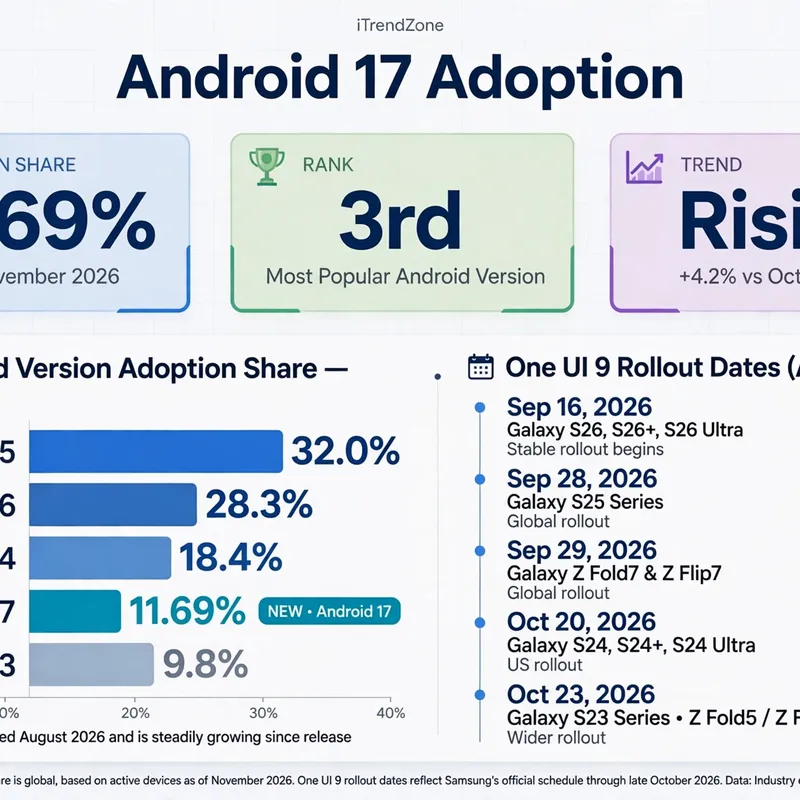
The chart above tells the story of Android 17’s first few months: it reached 11.69% of all Android devices, making it the 3rd most popular Android version, and it got there fast for a release that only went stable on June 16, 2026. That kind of adoption usually takes a full year. The driver is clear: the phones at the top of the upgrade list are the newest flagships — Pixel 10 and 11, Galaxy S26, OnePlus 15 — and those are exactly the phones with the hardware for Gemini Intelligence. Samsung’s One UI 9 rollout began on September 16, 2026 with the Galaxy S26, then reached the S25, S24, and S23 through October, pushing millions more devices onto Android 17 in weeks. QPR1 arrived around September 2026 and QPR2 is expected around December 2026.
Gemini in Chrome: A Browser That Reads Your Tabs
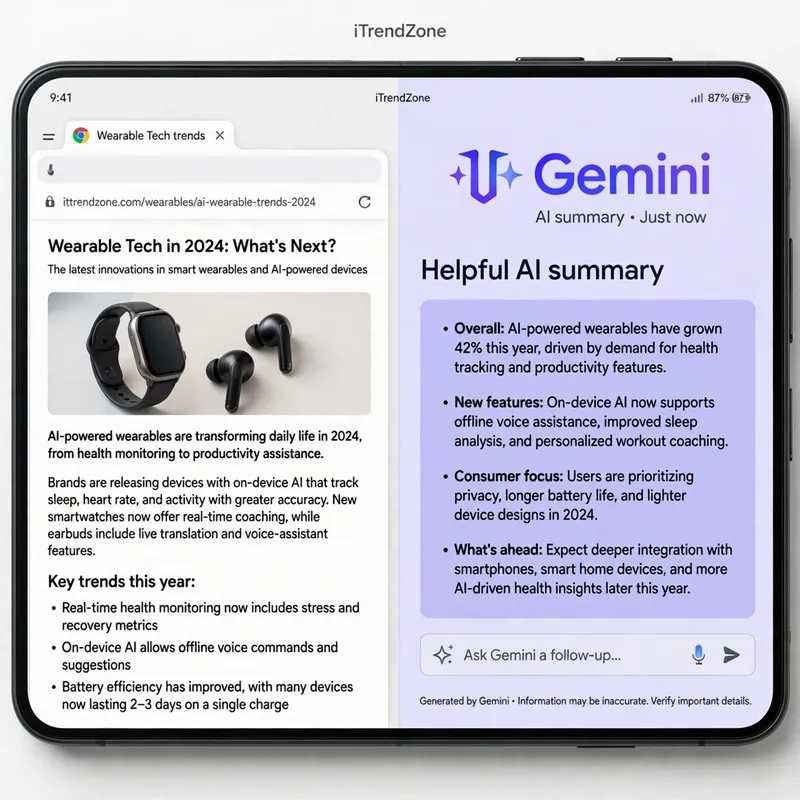
Gemini in Chrome arrived in late June 2026, and it made me rethink what a browser is for. Now I can ask Gemini to look across my open tabs, compare the information in them, and do something with what it finds. Last week I had four tabs open with hotel options. Instead of flipping between them, I asked which was cheapest for my dates, with breakfast included. It answered in seconds, and when I said “book the cheapest one,” it started the booking flow.
It can take actions like booking appointments, not just answer questions — that is where it starts to feel like the agent Google keeps talking about. I asked it to find a free slot in my calendar and book a haircut at my usual place, and it did, after confirming the time with me first. It does not silently spend your money or commit your calendar. The heavy lifting, the ten minutes of clicking around, is gone.
There is a privacy question here. For Gemini to compare your tabs, it has to read your tabs, and that means your browsing is part of what the AI sees. Google says the processing carries the same protections as the rest of Gemini, but if you keep sensitive things open in tabs, know what you are agreeing to. You can turn it off and choose which tabs it looks at. I leave it on, but I close tabs I do not need first. Our privacy and security tips for Android 17 explain the new contacts picker and session-only permissions.
The Smaller AI Touches That Add Up
Gemini Intelligence gets the headlines, but Android 17 is full of smaller AI-driven touches I notice every day. Pause Point is one of them: open an app you marked as distracting and the phone shows a 10-second countdown splash first — just long enough to ask whether you actually meant to open it. After a week, I was closing the app during the countdown more often than not.
App Bubbles let you shrink any app to a floating bubble while you do something else — handy when you are copying an address from a message into a map. Continue On picks up where you left off across Android devices. Screen Reactions is a small picture-in-picture creator tool. Underneath it all, Android 17 brings the practical stuff too: a native App Lock for individual apps, Live Updates for ongoing activities, Desktop Mode when you plug into a screen, and VVC video playback for better-looking video at smaller sizes — our camera tips for Android 17 cover what the new formats mean for your recordings. Material 3 Expressive brings a frosted glass look, and if your phone feels slow after the update, our performance tips for Android 17 will help.
The Honest Caveat: Demos Are Easy, Daily Use Is the Test
I want to be straight with you, because I have been burned by this before. Google has made big AI promises before that took a long time to feel useful in daily use. I remember the early Google Assistant, when the demos were incredible and the reality could set a timer and not much else. Gemini Intelligence looks impressive in demos, but the real test is daily use on real phones, with real apps and real spotty connections.
So far, the signs are good. The features above are things I have actually used, not things I watched in a keynote. But the edges are still rough. Gemini Intelligence sometimes misunderstands a request and does the wrong thing confidently, which is worse than doing nothing. It struggles with apps not yet updated for Android 17, and when it cannot reach the cloud, some tricks quietly stop working. It is a first version of something big, and first versions deserve honest expectations.
My advice is simple: if your phone qualifies, turn the features on and use them for two weeks before you decide. That is long enough for the novelty to wear off and the genuinely useful parts to show themselves. If your phone does not qualify, do not rush out to buy a new one just for this. The rest of Android 17 is still a solid update — there are hidden features in Android 17 worth finding, and the battery tips for Android 17 alone can make your current phone feel new again.
How to Get These Features on Your Phone
Getting started is straightforward. Pixel 6 through Pixel 11, the Pixel Fold, and the Pixel Tablet all get Android 17, though the Pixel 6 and 6 Pro get it as their last major update, with support ending in October 2026. The Pixel 8 and newer get seven years of updates. Samsung’s One UI 9 rollout started on September 16, 2026 with the Galaxy S26, then reached the S25, S24, and S23 through October. If the update has not arrived, check Settings, then System, then Software update — and if it still has not arrived, our Android 17 not working fix guide walks through the most common reasons an update gets stuck.
On Android 17, Gemini Intelligence is on by default on qualifying phones, under Settings, then Gemini. Rambler lives in Gboard settings, under Voice typing. Gemini in Chrome appears as a small button in the Chrome toolbar once it has rolled out to you. If a feature is missing, the rollout probably has not reached you yet — Google rolls these out in waves, and a week of patience fixes most of it. The official Android site has the full feature list, and Android Authority and PhoneArena both keep updated coverage of which phones have each feature. SamMobile is the best place to track Samsung’s rollout.
Quiz: Test What You Learned
1. What is the centerpiece AI feature of Android 17?
A) Google Assistant
B) Gemini Intelligence
C) Live Translate
D) Circle to Search
2. Which of these phones does NOT qualify for Gemini Intelligence?
A) Pixel 11
B) Galaxy S26
C) Pixel 9
D) OnePlus 15
3. What does Gboard’s Rambler mode do?
A) Records your voice and plays it back
B) Translates your speech into another language
C) Strips filler words and reshapes speech into clean text
D) Sends your dictation to a human typist
4. What does Pause Point do when you open a distracting app?
A) Locks the app for an hour
B) Shows a 10-second countdown splash
C) Sends a notification to your friends
D) Deletes the app from your home screen
5. When was Android 17 released as a stable version?
A) February 13, 2026
B) May 12, 2026
C) June 16, 2026
D) September 16, 2026
Answers: 1-B, 2-C, 3-C, 4-B, 5-C